环境配置
Node.js 开发环境配置指南
Rust 开发环境搭建完全指南
Docker + Docker Compose 开发环境从零搭建指南
Rust开发环境完全配置指南
Rust 开发环境配置完全指南(rustup + Cargo + IDE)
Go 语言开发环境配置指南 (macOS + Linux)
【图文详析】免费域名申请 + Cloudflare 全托管 + edgetunnel 边缘隧道部署全流程指南
【良心盘点】Cloudflare 免费版核心功能全景指南(实事求是·图文详解)
【实操与避坑】Cloudflare 免费版核心功能完全手册:额度底线、应用实战与实事求是测评
Image-Chat Gateway (img2chat-proxy) 架构设计与全流程部署使用指南
本站点使用 MrDoc 构建
-
+
Rust 开发环境配置完全指南(rustup + Cargo + IDE)
> 分类:环境配置 | 平台:macOS + Linux | 难度:⭐⭐ 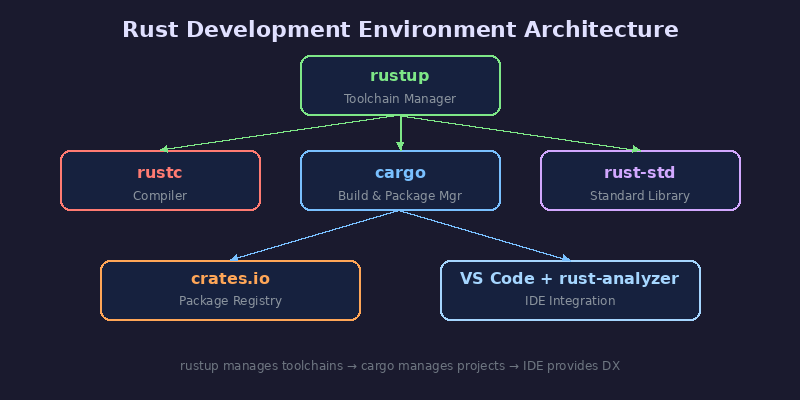 ## 目标环境 完成本指南后,你的终端应输出以下内容: ```bash $ rustc --version rustc 1.78.0 (9b00956e5 2024-04-21) $ cargo --version cargo 1.78.0 (c2b2e1f9a 2024-04-03) $ rustup show Default host: x86_64-unknown-linux-gnu rustup home: /home/user/.rustup installed toolchains -------------------- stable-x86_64-unknown-linux-gnu (default) active toolchain ----------------- stable-x86_64-unknown-linux-gnu (default) rustc 1.78.0 (9b00956e5 2024-04-21) ``` ## 系统要求 | 项目 | 最低要求 | |------|----------| | 操作系统 | macOS 10.15+ / Linux (glibc 2.17+) / Windows 10+ | | 磁盘空间 | ~1.5 GB(含工具链 + 文档) | | 网络 | 安装时需联网,支持代理 | | C 编译器 | Linux 需 `gcc` / macOS 需 Xcode Command Line Tools | > ⚠️ Linux 用户请先运行 `sudo apt install build-essential`(Debian/Ubuntu)或 `sudo dnf install gcc`(Fedora)。 ## 安装步骤 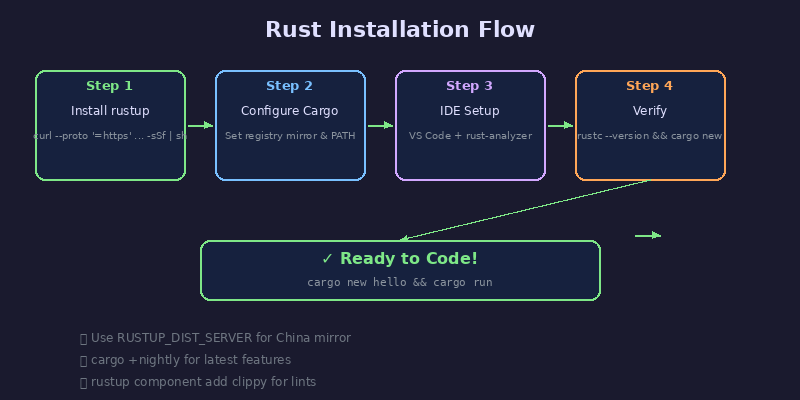 ### Step 1: 安装 rustup rustup 是 Rust 官方工具链管理器,负责安装和管理 rustc、cargo 等组件。 **macOS / Linux:** ```bash curl --proto '=https' --tlsv1.2 -sSf https://sh.rustup.rs | sh ``` 安装过程中会提示选择安装模式,直接按 `1` 选择默认安装即可。 **🇨🇳 国内镜像加速:** 如果下载速度慢,可以先设置镜像源: ```bash export RUSTUP_DIST_SERVER=https://mirrors.ustc.edu.cn/rust-static export RUSTUP_UPDATE_ROOT=https://mirrors.ustc.edu.cn/rust-static/rustup curl --proto '=https' --tlsv1.2 -sSf https://sh.rustup.rs | sh ``` **Windows:** 前往 [https://rustup.rs](https://rustup.rs) 下载 `rustup-init.exe` 运行。 **安装后刷新环境变量:** ```bash source $HOME/.cargo/env ``` 建议将以下内容加入 `~/.bashrc` 或 `~/.zshrc`: ```bash export PATH="$HOME/.cargo/bin:$PATH" ``` ### Step 2: 配置 Cargo Cargo 是 Rust 的构建工具和包管理器,随 rustup 自动安装。 **配置 crates.io 镜像(国内推荐):** 编辑或创建 `~/.cargo/config.toml`: ```toml [source.crates-io] replace-with = 'ustc' [source.ustc] registry = "https://mirrors.ustc.edu.cn/crates.io-index" ``` 也可使用字节跳动镜像: ```toml [source.rsproxy] registry = "https://rsproxy.cn/crates.io-index" [source.crates-io] replace-with = 'rsproxy' ``` **验证 Cargo 配置:** ```bash cargo --version cargo new hello_world cd hello_world cargo build ``` **常用 Cargo 命令速查:** | 命令 | 用途 | |------|------| | `cargo new <name>` | 创建新项目 | | `cargo build` | 编译项目 | | `cargo run` | 编译并运行 | | `cargo test` | 运行测试 | | `cargo check` | 快速检查语法(不生成二进制) | | `cargo add <crate>` | 添加依赖 | | `cargo update` | 更新依赖锁文件 | | `cargo doc --open` | 生成本地文档 | | `cargo clippy` | 运行代码 lint | | `cargo fmt` | 格式化代码 | ### Step 3: IDE 配置(VS Code + rust-analyzer) **推荐方案:Visual Studio Code + rust-analyzer** 1. 安装 [VS Code](https://code.visualstudio.com/) 2. 安装扩展: - **rust-analyzer**(必装,Rust 语言服务器,比官方 RLS 更快更稳定) - **CodeLLDB**(调试支持) - **Better TOML**(Cargo.toml 语法高亮) - **crates**(依赖版本提示与更新) 3. 安装 rust-analyzer 组件: ```bash rustup component add rust-analyzer ``` 4. VS Code `settings.json` 推荐配置: ```json { "rust-analyzer.checkOnSave.command": "clippy", "rust-analyzer.cargo.features": "all", "editor.formatOnSave": true, "[rust]": { "editor.defaultFormatter": "rust-lang.rust-analyzer" } } ``` **替代方案:** | IDE | 插件 | 备注 | |-----|------|------| | IntelliJ IDEA | Rust Plugin | 商业版体验最佳 | | Neovim | rust-tools.nvim | 需配合 LSP 配置 | | Helix | 内置 LSP | 零配置开箱即用 | | Zed | 内置 Rust 支持 | 新兴高性能编辑器 | ### Step 4: 验证安装 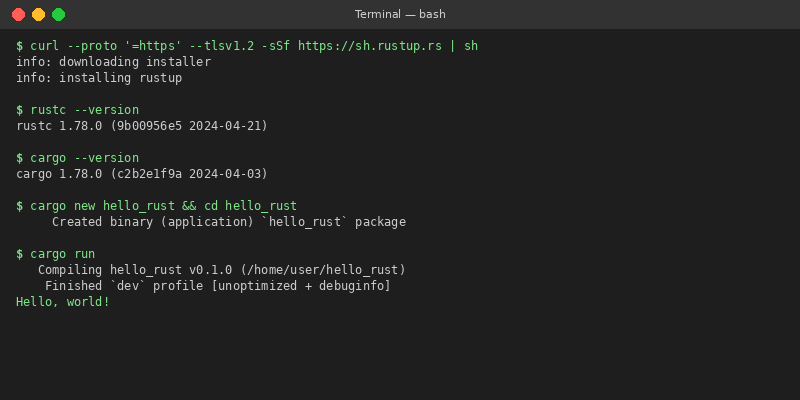 依次运行以下命令,确认所有组件正常: ```bash # 检查编译器 rustc --version # 检查包管理器 cargo --version # 检查工具链管理器 rustup show # 创建并运行第一个项目 cargo new hello_rust cd hello_rust cargo run # 预期输出: Hello, world! ``` **额外验证(可选):** ```bash # 安装常用组件 rustup component add clippy rustfmt rust-src # 验证 clippy cargo clippy # 验证格式化 cargo fmt --check # 安装 nightly 工具链(按需) rustup toolchain install nightly cargo +nightly --version ``` ## 常见问题 FAQ **Q: 安装时报 `error: linker 'cc' not found`** A: Linux 系统缺少 C 编译器。运行: ```bash sudo apt install build-essential # Debian/Ubuntu sudo dnf install gcc # Fedora ``` **Q: macOS 提示 `xcrun: error: invalid active developer path`** A: 需要安装 Xcode Command Line Tools: ```bash xcode-select --install ``` **Q: 国内下载 rustup 或 crate 非常慢怎么办?** A: 参考本文 Step 1 和 Step 2 的镜像配置。推荐使用 USTC 或 rsproxy 镜像。 **Q: 如何更新 Rust 工具链?** ```bash rustup update # 更新到最新 stable rustup update nightly # 更新 nightly rustup self update # 更新 rustup 自身 ``` **Q: `cargo build` 时报 `failed to run custom build command`** A: 可能是依赖的 C 库缺失。查看具体报错信息,安装对应的 `-dev` 包。 **Q: VS Code 中 rust-analyzer 一直 loading?** A: 首次打开项目时 rust-analyzer 需要索引,耐心等待。如持续卡住: 1. `Ctrl+Shift+P` → `rust-analyzer: Restart Server` 2. 确认项目根目录有 `Cargo.toml` 3. 检查 `rustup component add rust-analyzer` 是否已安装 **Q: 如何在多个 Rust 版本之间切换?** ```bash rustup default stable # 使用 stable rustup default nightly # 使用 nightly rustup default stable-1.70.0 # 使用指定版本 cargo +nightly build # 单次使用 nightly 编译 ``` **Q: 如何查看已安装的工具链和目标?** ```bash rustup toolchain list # 列出工具链 rustup target list --installed # 列出已安装目标 rustup target add x86_64-pc-windows-gnu # 交叉编译目标 ``` ## 卸载/清理 如果需要完全卸载 Rust 开发环境: ```bash # 1. 使用 rustup 卸载(推荐) rustup self uninstall # 2. 手动清理(如果 rustup 命令不可用) rm -rf ~/.cargo rm -rf ~/.rustup # 3. 清理环境变量 # 从 ~/.bashrc 或 ~/.zshrc 中删除以下行: # export PATH="$HOME/.cargo/bin:$PATH" # export RUSTUP_DIST_SERVER=... # export RUSTUP_UPDATE_ROOT=... # 4. 清理项目构建缓存 cd your_project && cargo clean ``` > 💡 卸载前建议备份 `~/.cargo/config.toml` 中的镜像配置,方便下次重装。 --- *本文最后更新:2026年5月 | Rust stable: 1.78.0*
admin
2026年5月17日 05:14
转发文档
收藏文档
上一篇
下一篇
手机扫码
复制链接
手机扫一扫转发分享
复制链接
Markdown文件
PDF文档(打印)
分享
链接
类型
密码
更新密码