编程入门
Java 入门教程:从零开始学 Java
零基础学 JavaScript 异步编程:从回调到 async/await
Rust 所有权与借用机制入门
Go 语言零基础教程 - 并发编程入门
Go 语言入门教程:并发编程基础(Goroutine 与 Channel)
Python 零基础入门:从第一行代码到独立编程
本站点使用 MrDoc 构建
-
+
Go 语言入门教程:并发编程基础(Goroutine 与 Channel)
> 分类:入门教程 | 语言:Go | 难度:⭐⭐ 初级 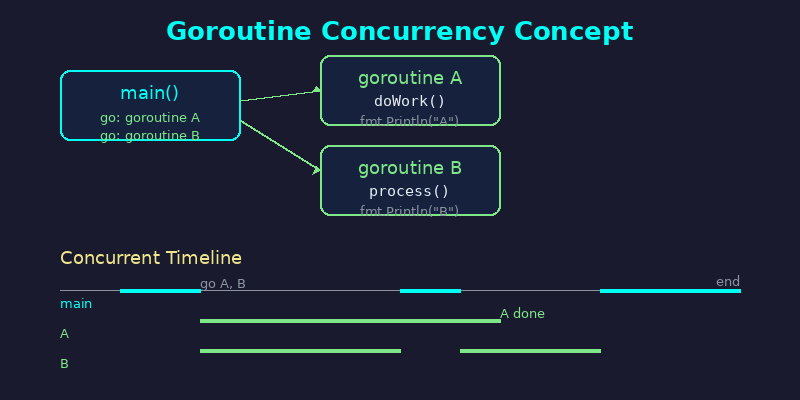 ## 学习目标 学完本文你将能够: - 理解 Goroutine 的基本概念与工作原理 - 使用 `go` 关键字启动并发任务 - 掌握 Channel 的创建与数据传递 - 编写简单的并发 Go 程序 - 避免初学者最常见的并发陷阱 ## 前置知识 在阅读本教程之前,你需要: - 已安装 Go 1.20+(可在终端运行 `go version` 验证) - 了解 Go 基本语法:变量、函数、包导入 - 知道如何运行 Go 程序:`go run main.go` 如果你还不熟悉 Go 基础语法,建议先学习 Go 官方教程的「A Tour of Go」。 ## 核心概念一:Goroutine ### 什么是 Goroutine? Goroutine 是 Go 语言中的轻量级线程。与操作系统线程动辄 1MB 栈空间不同,一个 Goroutine 初始只需约 2KB 栈空间,并且可以动态伸缩。这意味着你可以轻松创建**数万个** Goroutine 而不会耗尽内存。 ### 启动一个 Goroutine 只需在函数调用前加上 `go` 关键字: ```go package main import ( "fmt" "time" ) func sayHello() { fmt.Println("Hello from goroutine!") } func main() { go sayHello() // 启动一个 goroutine fmt.Println("Hello from main!") time.Sleep(time.Second) // 等待 goroutine 执行完(仅演示用) } ``` 运行结果(顺序可能不同): ``` Hello from main! Hello from goroutine! ``` > 注意:`time.Sleep` 只是演示用,实际开发中不要用它来等待 goroutine,后面会介绍正确的方式。 ### 匿名函数 Goroutine 更常见的写法是使用匿名函数: ```go go func(name string) { fmt.Printf("Hello, %s!\n", name) }("World") ``` ### Goroutine 的调度 Go 运行时自带调度器(M:N 调度模型),它将 M 个 Goroutine 映射到 N 个操作系统线程上。你无需手动管理线程池,调度器会自动处理。 ## 核心概念二:Channel 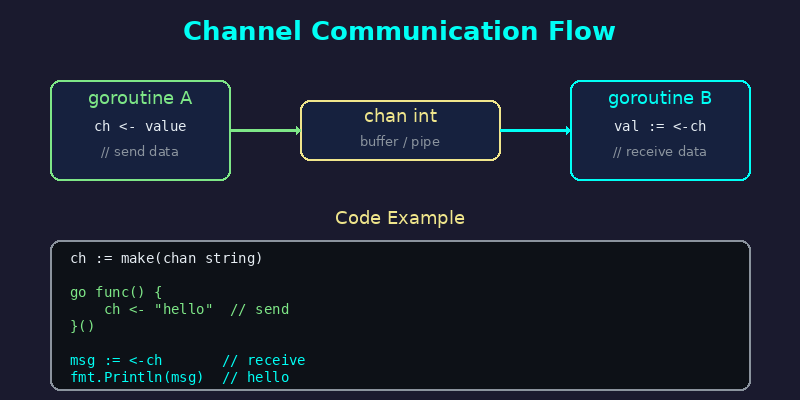 ### 为什么需要 Channel? 多个 Goroutine 并发执行时,它们需要**通信**和**同步**。Go 的哲学是: > **"Don't communicate by sharing memory; share memory by communicating."** > 不要通过共享内存来通信,而要通过通信来共享内存。 Channel 就是这个通信的管道。 ### 创建 Channel ```go ch := make(chan int) // 无缓冲 channel ch := make(chan int, 10) // 带缓冲 channel,缓冲区大小 10 ``` ### 发送与接收 ```go ch <- 42 // 发送:将 42 发送到 channel value := <-ch // 接收:从 channel 接收值并赋给 value ``` ### 完整示例:生产者-消费者 ```go package main import ( "fmt" ) func producer(ch chan<- int) { for i := 0; i < 5; i++ { ch <- i fmt.Printf("Produced: %d\n", i) } close(ch) // 发送完毕后关闭 channel } func consumer(ch <-chan int) { for val := range ch { // range 会自动在 channel 关闭后退出 fmt.Printf("Consumed: %d\n", val) } } func main() { ch := make(chan int) go producer(ch) consumer(ch) // 在 main goroutine 中消费 fmt.Println("Done!") } ``` 输出: ``` Produced: 0 Consumed: 0 Produced: 1 Consumed: 1 Produced: 2 Consumed: 2 Produced: 3 Consumed: 3 Produced: 4 Consumed: 4 Done! ``` ### 无缓冲 vs 带缓冲 | 特性 | 无缓冲 `make(chan int)` | 带缓冲 `make(chan int, N)` | |------|------------------------|---------------------------| | 发送阻塞 | 必须有接收方就绪 | 缓冲区满时才阻塞 | | 接收阻塞 | 必须有发送方就绪 | 缓冲区空时才阻塞 | | 典型场景 | 同步信号 | 异步生产-消费 | ### 单向 Channel Go 支持类型级别的方向约束: ```go func sender(ch chan<- int) { ch <- 42 } // 只能发送 func receiver(ch <-chan int) { <-ch } // 只能接收 ``` ## 动手练习 ### 练习 1:并发下载模拟 编写一个程序,模拟并发下载 3 个文件,使用 `sync.WaitGroup` 等待所有下载完成: ```go package main import ( "fmt" "math/rand" "sync" "time" ) func download(wg *sync.WaitGroup, id int) { defer wg.Done() duration := time.Duration(rand.Intn(3)+1) * time.Second time.Sleep(duration) fmt.Printf("File %d downloaded (took %v)\n", id, duration) } func main() { rand.Seed(time.Now().UnixNano()) var wg sync.WaitGroup for i := 1; i <= 3; i++ { wg.Add(1) go download(&wg, i) } wg.Wait() fmt.Println("All downloads complete!") } ``` ### 练习 2:Pipeline 模式 使用 Channel 连接多个处理阶段: ```go package main import "fmt" func generate(nums ...int) <-chan int { out := make(chan int) go func() { for _, n := range nums { out <- n } close(out) }() return out } func square(in <-chan int) <-chan int { out := make(chan int) go func() { for n := range in { out <- n * n } close(out) }() return out } func main() { // 构建流水线: generate -> square -> print for result := range square(generate(2, 3, 4)) { fmt.Println(result) // 输出: 4, 9, 16 } } ``` ## 常见新手误区 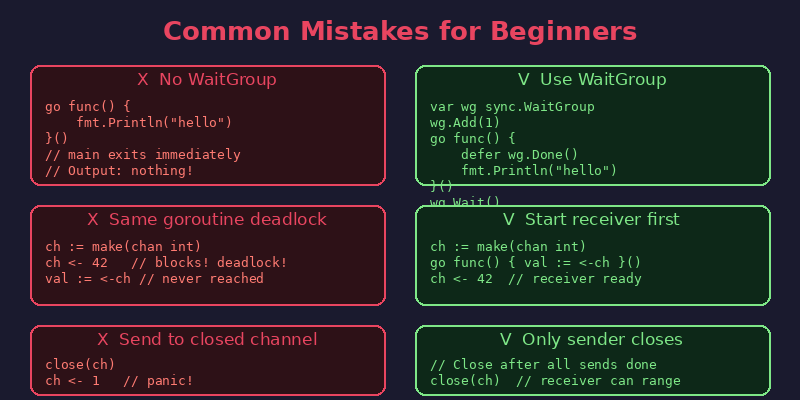 ### 误区 1:不等待 Goroutine 完成 main 函数返回后,所有 goroutine 都会被终止。很多初学者忘了等待: ```go // 错误:程序立即退出,goroutine 来不及执行 go func() { fmt.Println("hello") }() // main 结束了! ``` **正确做法**:使用 `sync.WaitGroup` ```go var wg sync.WaitGroup wg.Add(1) go func() { defer wg.Done() fmt.Println("hello") }() wg.Wait() // 等待所有 goroutine 完成 ``` ### 误区 2:无缓冲 Channel 死锁 在同一个 goroutine 中发送和接收无缓冲 channel 会导致死锁: ```go // 错误:死锁!发送方阻塞等待接收方,但接收方在后面 ch := make(chan int) ch <- 42 // 永远阻塞 val := <-ch // 永远执行不到 ``` **正确做法**:先启动接收方 goroutine ```go ch := make(chan int) go func() { val := <-ch; fmt.Println(val) }() ch <- 42 // 现在接收方已就绪 ``` ### 误区 3:向已关闭的 Channel 发送数据 关闭 channel 后再发送数据会导致 **panic**: ```go ch := make(chan int) close(ch) ch <- 1 // panic: send on closed channel ``` **规则**:只有发送方(生产者)应该关闭 channel,接收方永远不要关闭。 ## 下一步 恭喜你掌握了 Go 并发编程的基础!接下来可以继续学习: 1. **select 语句**:同时监听多个 channel,实现多路复用 2. **context 包**:控制 goroutine 的生命周期和超时 3. **sync 包**:Mutex、RWMutex、Once 等同步原语 4. **并发模式**:Worker Pool、Fan-in/Fan-out、Pipeline 等经典模式 推荐资源: - Go 官方博客:[Go Concurrency Patterns](https://go.dev/blog/pipelines) - 书籍:《Concurrency in Go》— Katherine Cox-Buday - 练习:Go by Example 的 [Concurrency](https://gobyexample.com/goroutines) 章节
admin
2026年5月17日 05:19
转发文档
收藏文档
上一篇
下一篇
手机扫码
复制链接
手机扫一扫转发分享
复制链接
Markdown文件
PDF文档(打印)
分享
链接
类型
密码
更新密码