环境配置
Node.js 开发环境配置指南
Rust 开发环境搭建完全指南
Docker + Docker Compose 开发环境从零搭建指南
Rust开发环境完全配置指南
Rust 开发环境配置完全指南(rustup + Cargo + IDE)
Go 语言开发环境配置指南 (macOS + Linux)
【图文详析】免费域名申请 + Cloudflare 全托管 + edgetunnel 边缘隧道部署全流程指南
【良心盘点】Cloudflare 免费版核心功能全景指南(实事求是·图文详解)
【实操与避坑】Cloudflare 免费版核心功能完全手册:额度底线、应用实战与实事求是测评
Image-Chat Gateway (img2chat-proxy) 架构设计与全流程部署使用指南
本站点使用 MrDoc 构建
-
+
Rust开发环境完全配置指南
> 分类:环境配置 | 平台:Linux + macOS | 难度:⭐⭐ 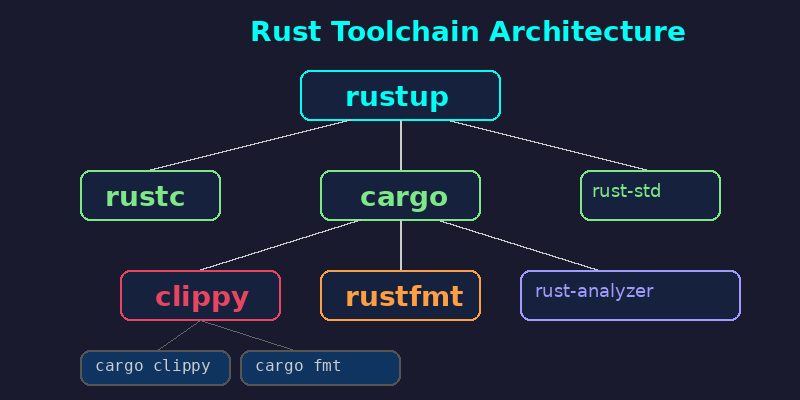 ## 目标环境 完成本文所有步骤后,运行以下命令验证: ```bash rustc --version # rustc 1.78.0 (9b00956e5 2024-04-29) cargo --version # cargo 1.78.0 (54d8815d0 2024-03-26) rustup --version # rustup 1.27.1 cargo clippy --version cargo fmt --version rust-analyzer --version ``` ## 系统要求 | 项目 | 最低要求 | |------|----------| | 操作系统 | Linux (x86_64/aarch64) / macOS (Intel/Apple Silicon) | | 内存 | ≥ 2 GB(编译大型项目建议 4GB+) | | 磁盘 | ≥ 2 GB(完整工具链 + 文档约 1.5GB) | | 网络 | 需要访问 static.rust-lang.org 和 crates.io | ## 安装步骤 ### Step 1: 安装 rustup 与 Rust 工具链 rustup 是 Rust 官方的工具链管理器,负责安装、更新和管理 Rust 版本及组件。 **Linux / macOS:** ```bash curl --proto '=https' --tlsv1.2 -sSf https://sh.rustup.rs | sh ``` 安装过程中选择默认安装(选项 `1`)即可。安装完成后,加载环境变量: ```bash source $HOME/.cargo/env ``` **验证安装:** ```bash rustc --version cargo --version rustup --version ``` 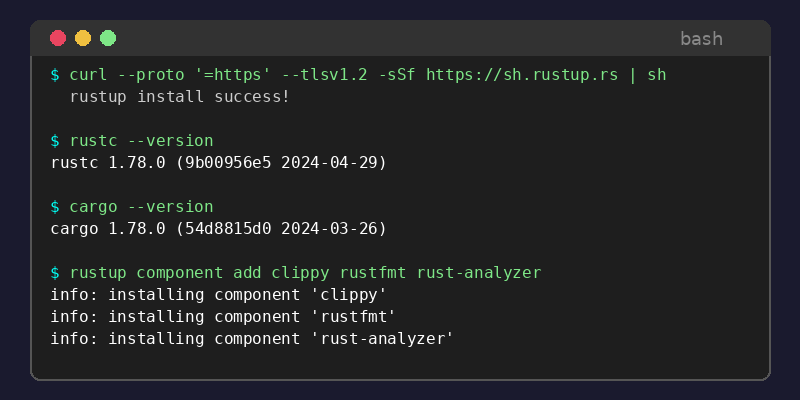 ### Step 2: 配置镜像源(国内用户推荐) 如果在国内,crates.io 访问可能较慢,建议配置中科大或字节跳动镜像: 编辑 `~/.cargo/config.toml`: ```toml [source.crates-io] replace-with = "ustc" [source.ustc] registry = "sparse+https://mirrors.ustc.edu.cn/crates.io-index/" # 或者使用字节跳动镜像 # [source.rsproxy] # registry = "sparse+https://rsproxy.cn/crates.io-index/" ``` ### Step 3: 安装核心组件 ```bash # Lint 工具 — 捕获常见错误和改进建议 rustup component add clippy # 代码格式化 rustup component add rustfmt # LSP 服务器 — IDE 集成必备 rustup component add rust-analyzer # 源码(用于 IDE 跳转标准库) rustup component add rust-src # LLVM 工具(可选,用于 cargo-expand 等) rustup component add llvm-tools-preview ``` ### Step 4: 安装常用 cargo 扩展 ```bash # cargo-expand — 宏展开 cargo install cargo-expand # cargo-watch — 文件变更自动编译 cargo install cargo-watch # cargo-edit — 依赖管理(cargo add/rm) cargo install cargo-edit # cargo-audit — 安全漏洞扫描 cargo install cargo-audit # cargo-outdated — 检查过时依赖 cargo install cargo-outdated # cargo-flamegraph — 性能火焰图 cargo install flamegraph ``` ### Step 5: 配置 VS Code 开发环境 1. 安装扩展 **rust-analyzer**(官方 LSP 客户端) 2. 安装扩展 **CodeLLDB**(调试支持) 3. 可选扩展:**Even Better TOML**、**crates**(依赖版本提示) 在项目 `.vscode/settings.json` 中添加: ```json { "rust-analyzer.check.command": "clippy", "rust-analyzer.cargo.features": "all", "rust-analyzer.inlayHints.enable": true, "[rust]": { "editor.defaultFormatter": "rust-lang.rust-analyzer", "editor.formatOnSave": true } } ``` ### Step 6: 配置 Neovim 开发环境 使用 **lazy.nvim** 或 **packer.nvim** 安装以下插件: ```lua -- LSP 配置 require('lspconfig').rust_analyzer.setup{ settings = { ['rust-analyzer'] = { checkOnSave = { command = "clippy" }, cargo = { features = "all" } } } } -- 调试适配(nvim-dap) local dap = require('dap') dap.adapters.lldb = { type = 'executable', command = 'lldb-vscode', name = 'lldb' } dap.configurations.rust = { { name = 'Launch', type = 'lldb', request = 'launch', program = function() return vim.fn.input('Path to executable: ', vim.fn.getcwd() .. '/target/debug/', 'file') end, cwd = '${workspaceFolder}', stopOnEntry = false, } } ``` 推荐插件组合:`rust-tools.nvim` + `nvim-dap` + `nvim-cmp` + `LuaSnip` ### Step 7: 创建第一个项目并验证 ```bash cargo new hello_rust cd hello_rust # 编译运行 cargo run # 输出: Hello, world! # 运行 clippy 检查 cargo clippy # 格式化代码 cargo fmt # 监听文件变更自动编译 cargo watch -x run ``` ## 常见问题 FAQ ### Q: rustup 安装后命令找不到? 确保 `source $HOME/.cargo/env` 已执行,或将其加入 `~/.bashrc` / `~/.zshrc`: ```bash echo 'source $HOME/.cargo/env' >> ~/.bashrc ``` ### Q: macOS 上 linker 报错? 安装 Xcode Command Line Tools: ```bash xcode-select --install ``` ### Q: rust-analyzer 占用内存过高? 在 `.vscode/settings.json` 中限制: ```json { "rust-analyzer.cargo.check.invocationStrategy": "once", "rust-analyzer.checkOnSave.extraArgs": ["--target-dir", "/tmp/ra-check"] } ``` ### Q: 如何切换 nightly/stable 工具链? ```bash # 安装 nightly rustup toolchain install nightly # 在项目中使用 nightly rustup override set nightly # 或单次运行 cargo +nightly build ``` ### Q: 交叉编译到 ARM / musl 目标? ```bash # 添加目标 rustup target add aarch64-unknown-linux-gnu rustup target add x86_64-unknown-linux-musl # 编译 cargo build --target x86_64-unknown-linux-musl ``` ## 卸载/清理 ```bash # 完全卸载 Rust 工具链 rustup self uninstall # 清理 cargo 缓存(~/.cargo/registry 和 ~/.cargo/git) cargo cache -a # 需要 cargo install cargo-cache # 手动清理 rm -rf ~/.cargo/registry/cache rm -rf ~/.cargo/registry/src rm -rf ~/.rustup/toolchains ``` 卸载后检查并移除环境变量配置(`~/.bashrc` / `~/.zshrc` 中 `source $HOME/.cargo/env` 行)。
admin
2026年5月17日 02:11
转发文档
收藏文档
上一篇
下一篇
手机扫码
复制链接
手机扫一扫转发分享
复制链接
Markdown文件
PDF文档(打印)
分享
链接
类型
密码
更新密码